
python yaml vs. xml vs. json
🔸 Reading a CSV File in Python
👉 Goal: Read a CSV of routers (name, IP, location) → turn it into a list in Python → print data.
import csv

# Open CSV file
with open("router_list.csv") as fh:
    csv_list = csv.reader(fh)

    # Loop through each row (list of values)
    for row in csv_list:
        device_name = row[0]
        ip_address = row[1]
        location = row[2]

        print(f"{device_name} is in {location} with IP {ip_address}")
Explanation:
csv.reader(fh)parses CSV data → returns rows as lists.We loop through and extract columns by index.
🔸 Writing to a CSV File in Python
👉 Goal: Take user input → append it to the router CSV.
import csv

# Get input from user
hostname = input("Enter router name: ")
ip_address = input("Enter IP address: ")
location = input("Enter location: ")

# Prepare row
router = [hostname, ip_address, location]

# Append to CSV
with open("router_list.csv", "a", newline='') as fh:
    writer = csv.writer(fh, quoting=csv.QUOTE_ALL)
    writer.writerow(router)

print("Router added successfully!")
Explanation:
"a"mode → append, does not overwrite existing CSV.quoting=csv.QUOTE_ALL→ forces quotes around every value → useful for consistency.writer.writerow(router)→ adds a row to the CSV.
🗂 Summary of the Lesson Concepts
| Concept | Purpose / Use Case |
csv.reader() | Read CSV data (rows → lists) |
csv.writer() | Write to CSV file |
with open(...) | Safely open/close file (best practice) |
newline='' in open() | Prevents adding extra blank lines on Windows |
csv.QUOTE_ALL | Add quotes to all fields (important for CSV parsing) |
📌 Practical DevOps Use Case Examples
1️⃣ Parsing router or server inventory files
2️⃣ Parsing CSVs with IP addresses, firewall rules, etc.
3️⃣ Updating inventory CSVs from automation scripts
4️⃣ Integrating with tools that export CSV reports (Nagios, Zabbix, etc.)
What is XML?
Extensible Markup Language (XML) lets you define and store data in a shareable manner. XML supports information exchange between computer systems such as websites, databases, and third-party applications. Predefined rules make it easy to transmit data as XML files over any network because the recipient can use those rules to read the data accurately and efficiently.
Why is XML important?
Extensible Markup Language (XML) is a markup language that provides rules to define any data. Unlike other programming languages, XML cannot perform computing operations by itself. Instead, any programming language or software can be implemented for structured data management.
For example, consider a text document with comments on it. The comments might give suggestions like these:
Make the title bold
This sentence is a header
This word is the author
Such comments improve the document’s usability without affecting its content. Similarly, XML uses markup symbols to provide more information about any data. Other software, like browsers and data processing applications, use this information to process structured data more efficiently.
XML tags
You use markup symbols, called tags in XML, to define data. For example, to represent data for a bookstore, you can create tags such as <book>, <title>, and <author>. Your XML document for a single book would have content like this:
<book>
<title> Learning Amazon Web Services </title>
<author> Mark Wilkins </author>
</book>
Tags bring sophisticated data coding to integrate information flows across different systems.
What are the benefits of using XML?
Support interbusiness transactions
When a company sells a good or service to another company, the two businesses need to exchange information like cost, specifications, and delivery schedules. With Extensible Markup Language (XML), they can share all the necessary information electronically and close complex deals automatically, without any human intervention.
Maintain data integrity
XML lets you transfer data along with the data’s description, preventing the loss of data integrity. You can use this descriptive information to do the following:
Verify data accuracy
Automatically customize data presentation for different users
Store data consistently across multiple platforms
Improve search efficiency
Computer programs like search engines can sort and categorize XML files more efficiently and precisely than other types of documents. For example, the word mark can be either a noun or a verb. Based on XML tags, search engines can accurately categorize mark for relevant search results. Thus, XML helps computers to interpret natural language more efficiently.
Design flexible applications
With XML, you can conveniently upgrade or modify your application design. Many technologies, especially newer ones, come with built-in XML support. They can automatically read and process XML data files so that you can make changes without having to reformat your entire database.
What are the applications of XML?
Extensible Markup Language (XML) is the underlying technology in thousands of applications, ranging from common productivity tools like word processing to book publishing software and even complex application configuration systems.
Data transfer
You can use XML to transfer data between two systems that store the same data in different formats. For example, your website stores dates in MM/DD/YYYY format, but your accounting system stores dates in DD/MM/YYYY format. You can transfer the data from the website to the accounting system by using XML. Your developers can write code that automatically converts the following:
Website data to XML format
XML data to accounting system data
Accounting system data back to XML format
XML data back to website data
Web applications
XML gives structure to the data that you see on webpages. Other website technologies, like HTML, work with XML to present consistent and relevant data to website visitors. For example, consider an e-commerce website that sells clothes. Instead of showing all clothes to all visitors, the website uses XML to create customized webpages based on user preferences. It shows products from specific brands by filtering the <brand> tag.
Documentation
You can use XML to specify the structural information of any technical document. Other programs then process the document structure to present it flexibly. For example, there are XML tags for a paragraph, an item in a numbered list, and a heading. Using these tags, other types of software automatically prepare the document for uses such as printing and webpage publication.
Data type
Many programming languages support XML as a data type. With this support, you can easily write programs in other languages that work directly with XML files.
What are the components of an XML file?
An Extensible Markup Language (XML) file is a text-based document that you can save with the .xml extension. You can write XML similar to other text files. To create or edit an XML file, you can use any of the following:
Text editors like Notepad or Notepad++
Online XML editors
Web browsers
Any XML file includes the following components.
XML document
The <xml></xml> tags are used to mark the beginning and end of an XML file. The content within these tags is also called an XML document. It is the first tag that any software will look for to process XML code.
XML declaration
An XML document begins with some information about XML itself. For example, it might mention the XML version that it follows. This opening is called an XML declaration. Here's an example.
<?xml version="1.0" encoding="UTF-8"?>
XML elements
All the other tags you create within an XML document are called XML elements. XML elements can contain these features:
Text
Attributes
Other elements
All XML documents begin with a primary tag, which is called the root element.
For example, consider the XML file below.
<InvitationList>
<family>
<aunt>
<name>Christine</name>
<name>Stephanie</name>
</aunt>
</family>
</InvitationList>
<InvitationList> is the root element; family and aunt are other element names.
XML attributes
XML elements can have other descriptors called attributes. You can define your own attribute names and write the attribute values within quotation marks as shown below.
<person age=“22”>
XML content
The data in XML files is also called XML content. For example, in the XML file, you might see data like this.
<friend>
<name>Charlie</name>
<name>Steve</name>
</friend>
The data values Charlie and Steve are the content.
What is an XML schema?
An Extensible Markup Language (XML) schema is a document that describes some rules or limits on the structure of an XML file. You can describe these constraints in several different ways, like these:
Grammatical rules to determine the order of elements
Yes or No conditions that the content must satisfy
Data types for the content in XML files
Constraints for data integrity
For example, an XML schema for bookstores might impose constraints like these:
A book element will have the attributes title and author.
The book element will be nested under a category element with an attribute name.
The price of a book will be a separate element nested under book.
To meet these constraints, we will write the XML file as shown below.
<category name=“Technology”>
<book title=“Learning Amazon Web Services”, author=“Mark Wilkins”>
<price>$20</price>
</book>
</category>
XML schemas enforce consistency in how different software applications create and use XML files. Some industries implement XML schemas that are specific to their operations to reduce complexity in writing XML code for interbusiness data transfer. For example, Scalable Vector Graphics (SVG) is an XML specification for describing computer graphics-related data. Software developers write XML files so that they meet such industry specifications.
What is an XML parser?
An Extensible Markup Language (XML) parser is software that can process or read XML documents to extract the data within them. XML parsers also check the syntax or rules of the XML file and can validate it against a particular XML schema. Because XML is a strict markup language, the parsers will not process the file if there are any validation or syntax errors. For example, the XML parser will give errors if any of these conditions are true:
A closing tag or end tag is missing
Attribute values don’t have quotation marks
A schema condition has not been met
Software applications use XML parsers to transform XML files into native data types. They can thus focus on the application logic without having to go into the details of the XML itself.
How is XML different from HTML?
HyperText Markup Language (HTML) is the language used in most webpages. A web browser processes the HTML documents and displays them as a multimedia page. The World Wide Web Consortium (W3C) is the international community that develops protocols and guidelines to ensure the long-term growth of the web. W3C established both the HTML and Extensible Markup Language (XML) standards that website developers implement for consistency and quality.
XML vs. HTML
While HTML and XML files look very similar, there are some key differences.
Purpose
The purpose of HTML is to present and display data. However, XML stores and transports data.
Tags
HTML has predefined tags, but users can create and define their own tags in XML.
Syntax rules
There are some minor yet important differences between HTML and XML syntax. For example, XML is case sensitive, but HTML is not. XML parsers will give errors if you write a tag as <Book> instead of <book>.
What is XML
XML, or eXtensible Markup Language, is a markup language planned to store and transport data. It provides a way to structure documents in a format that is both human-readable and machine-readable. XML uses tags to define elements and attributes, allowing users to create custom tags and structures based on their specific needs.
Key Features of XML:
Extensibility:
- Users can define their own tags and structures, making XML extensible and adaptable to various data formats and use cases.
Human-Readable and Machine-Readable:
- XML is designed to be both human-readable (making it easy for people to understand) and machine-readable (suitable for processing by computers and applications).
Hierarchical Structure:
- XML documents have a hierarchical structure with nested elements, representing a tree-like organization of data.
Platform-Independent:
- XML is platform-independent and can be used on any operating system or device.
Self-Descriptive:
- XML documents are self-descriptive, meaning they contain information about the structure and meaning of the data they represent.
Unicode Support:
- XML supports Unicode, allowing representation of characters from various languages and character sets.
Standardized Syntax:
- XML follows a standardized syntax with open and close tags, attributes, and nested elements, providing a consistent structure.
Data Exchange:
- XML is commonly used for data exchange between different systems, applications, and platforms.
Configuration Files:
- XML is often used to store configuration settings and data in various applications, facilitating easy customization.
What is top use cases of XML?
Top Use Cases of XML:
Web Services and APIs:
- XML is widely used in web services and APIs for data exchange between clients and servers. SOAP (Simple Object Access Protocol) and RESTful APIs often use XML to structure data in requests and responses.
Data Interchange:
- XML is a common format for data interchange between heterogeneous systems. It is used in scenarios where different systems need to share structured data.
Configuration Files:
- Many applications use XML for storing configuration settings. This includes software applications, web servers, and various systems where customizable settings are required.
Markup Language for Documents:
- XML serves as a foundation for creating other markup languages. For example, XHTML (Extensible Hypertext Markup Language) is an XML-based version of HTML (Hypertext Markup Language) used for structuring web content.
Data Storage:
- XML is used for storing and organizing structured data. It provides a format that is easy to read and understand, making it suitable for data storage and retrieval.
Platform-Independent Data Representation:
- XML’s platform-independent nature makes it a suitable choice for representing data that needs to be exchanged between different platforms, applications, or databases.
Document Processing:
- XML is used for document processing and management, enabling the creation, storage, and exchange of structured documents.
Metadata Representation:
- XML is often employed for representing metadata in various contexts, such as in data catalogs, digital libraries, and content management systems.
Configuration of Software and Systems:
- XML is commonly used for configuring software applications, databases, and systems. It provides a standardized way to structure and store configuration information.
Data Validation:
- XML Schema Definition (XSD) or Document Type Definition (DTD) can be used to define the structure and rules for validating XML documents, ensuring data integrity.
Data Transformation:
- XML is used in data transformation processes, where data from one format is converted into XML for compatibility or integration purposes.
RSS Feeds:
- XML is used in creating and parsing RSS (Really Simple Syndication) feeds, allowing for the distribution of content updates in a standardized format.
XML’s versatility and flexibility make it a valuable tool for a wide range of applications where structured data needs to be exchanged, stored, and processed. Its open nature and compatibility with other technologies contribute to its widespread adoption.
What are feature of XML?
Features of XML
Features of XML (eXtensible Markup Language):
XML is a versatile and extensible markup language designed for storing and transporting data. Here are some key features of XML:
Extensibility:
- XML is extensible, allowing users to define their own tags and structures to suit their specific needs and data requirements.
Hierarchy:
- XML documents have a hierarchical structure with nested elements, forming a tree-like organization of data. This structure allows for the representation of relationships between different data elements.
Human-Readable and Machine-Readable:
- XML is both human-readable and machine-readable. Its syntax is straightforward and uses tags to define elements, making it accessible to users and easily processed by machines.
Self-Descriptive:
- XML documents are self-descriptive, containing information about the structure and meaning of the data they represent. This self-descriptive nature enhances understanding and interpretation.
Platform-Independent:
- XML is platform-independent, meaning it can be used across different operating systems and devices without modification. This makes it suitable for data interchange between heterogeneous systems.
Unicode Support:
- XML supports Unicode, allowing the representation of characters from various languages and character sets. This ensures compatibility with internationalization requirements.
Standardized Syntax:
- XML follows a standardized syntax with open and close tags, attributes, and nested elements. This consistency in syntax makes XML documents easily recognizable and interpretable.
Data Exchange:
- XML is commonly used for data exchange between different systems, applications, and platforms. It gives a standardized format for representing structured data.
Markup Language Foundation:
- XML serves as the foundation for creating other markup languages. For example, XHTML (Extensible Hypertext Markup Language) is an XML-based version of HTML (Hypertext Markup Language) used for structuring web content.
Validation:
- XML documents can be validated against a schema definition using technologies like XML Schema Definition (XSD) or Document Type Definition (DTD). This enables the enforcement of specific rules and constraints on the structure of XML data.
What is the workflow of XML?
Workflow of XML:
- Document Creation:
- Begin by creating an XML document. This involves defining the root element and structuring the document with nested elements to represent the desired data.
   <?xml version="1.0" encoding="UTF-8"?>
   <root>
     <element1>Value1</element1>
     <element2>Value2</element2>
   </root>
- Document Structure:
- Define the structure of the XML document applying elements, attributes, and their relationships. Elements are enclosed in open and close tags, and attributes provide additional information about elements.
Extensibility:
Take advantage of XML’s extensibility by creating custom tags and structures based on the specific requirements of the data being represented. This allows for flexibility and adaptability.
Attributes and Values:
Use attributes within elements to provide additional information, and assign values to elements to represent the actual data being stored.
   <person id="1">
     <name>Martin Doe</name>
     <age>30</age>
   </person>
- Validation (Optional):
- Optionally, define a schema for the XML document using technologies like XML Schema Definition (XSD) or Document Type Definition (DTD). This step helps confirm that the XML document adheres to specific rules and constraints.
Data Exchange:
XML documents can be exchanged between different systems or applications. Data can be sent and received in XML format, enabling interoperability.
Processing:
XML documents can be processed by applications or systems that understand the XML syntax. This may involve parsing the XML document, extracting data, and performing operations based on the content.
Transformation (Optional):
XML documents can be transformed using technologies such as XSLT (Extensible Stylesheet Language Transformations). Transformation involves converting XML data into different formats for presentation or storage.
Storage:
XML documents can be stored in databases, files, or other storage mechanisms. The structured nature of XML makes it suitable for organizing and retrieving data.
Interoperability:
XML facilitates interoperability between systems by providing a standardized format for data exchange. Systems that understand XML can communicate and share data seamlessly.
Document Retrieval:
Retrieve XML documents from storage or external sources when needed. The hierarchical structure allows for easy navigation and extraction of specific data elements.
Updates and Edits:
Make updates or edits to XML documents as needed. This may involve adding, modifying, or deleting elements to reflect changes in the underlying data.
The workflow of XML involves the creation, structuring, validation (optional), exchange, processing, and storage of XML documents. XML’s versatility and standardized syntax make it a powerful tool for representing and exchanging structured data in a wide range of applications.
How XML Works & Architecture?
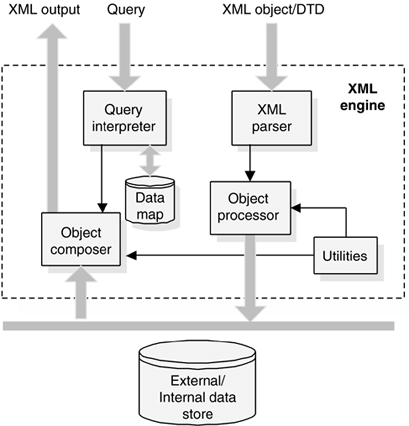
XML Works & Architecture
XML (Extensible Markup Language) is a text-based format for structuring data. It’s widely used for exchanging information between different applications and systems. Following is a breakdown of how XML works and its architecture:
1. Building Blocks:
Elements: Represent data units and are enclosed by opening (
<) and closing (>) tags.Attributes: Provide additional information about elements and are specified within the opening tag with
key="value".Content: Textual data or other elements contained within an element.
Namespace: Identifies the vocabulary used in an XML document, reducing ambiguity when dealing with elements from different sources.
2. Structure and Hierarchy:
XML documents have a tree-like structure, with the root element at the top and child elements branching out from it.
Elements can be nested within each other to generate complex data structures.
3. Processing and Validation:
XML documents can be processed by XML parsers, which convert them into internal data structures for applications to use.
DTD (Document Type Definition) and XSD (XML Schema) define the structure and rules for valid XML documents.
Validation against these definitions ensures data integrity and consistency.
4. Benefits:
Platform-independent: Can be used across various platforms and operating systems.
Human-readable: Easy to understand and edit even without programming knowledge.
Extensible: Can be easily adapted to different data needs.
Interoperable: Enables seamless data exchange between different applications.
5. Architecture:
XML Documents: Represent the structured data itself.
Parsers: Convert XML documents into internal data structures for applications to use.
APIs: Provide programmatic access to the parsed data.
Applications: Utilize the data for various purposes, such as data exchange, configuration, or content management.
6. Examples of XML Usage:
Web services: Used for data exchange between web applications.
Configuration files: Store settings for applications and systems.
E-commerce: Used for product information and order processing.
Content management: Manage website content and structure.
7. Resources:
W3Schools XML Tutorial
XML.com
The W3C XML Recommendation
XML Schema Tutorial
Points to Remember:
Understanding XML’s structure and syntax is crucial for effectively working with this versatile data format.
Utilize parsers and APIs to integrate XML data within your applications.
Consider the benefits and limitations of XML when choosing a data format for your project.
By exploring the provided resources and practicing with XML, you can leverage its capabilities for data exchange, configuration, and other applications.
How to Install and Configure XML?
While XML itself doesn’t require installation, using it effectively often involves installing and configuring various tools depending on your specific needs. Here’s a breakdown of different scenarios:
1. Basic Text Editing:
For simple XML documents, any text editor like Notepad++ or Sublime Text can be used.
No installation is required, simply write your XML code and save the file with the “.xml” extension.
2. XML Parsing and Validation:
To process and validate XML documents, you need an XML parser.
Popular options include:
Python:
xml.etree.ElementTreelibrary.JavaScript:
DOMParserorXMLSerializerAPIs.Java:
javax.xml.parsers.DocumentBuilderFactoryclass.
These libraries require installation within your chosen programming environment.
3. XML Schema Validation:
For stricter validation based on defined structures, you might need an XML Schema validator.
Popular options include:
XMLStarlet: Command-line tool for validation and transformation.
Oxygen XML Editor: Comprehensive editor with built-in validation and other advanced features.
Eclipse IDE: With plugins like WTP and XSD editor for validation.
These tools require installation and may have specific configuration steps.
4. Web Services and APIs:
If using XML for web services or APIs, you need tools for building and consuming services.
Popular frameworks include:
SOAP: Java with Apache Axis2 or Axis, Python with suds-jurko.
REST: Various frameworks like Django REST framework (Python), Spring MVC (Java).
These frameworks require installation and configuration specific to your chosen platform and service type.
5. Content Management Systems:
Some CMS platforms like WordPress utilize XML for storing content and data.
Installation and configuration involve setting up the CMS itself and configuring its XML capabilities.
6. Additional Tools:
XML editors: Provide code completion, syntax highlighting, and other features for easier development.
XML viewers: Allow visualization and exploration of complex XML structures.
XSLT processors: Transform XML documents into other formats like HTML or PDF.
Points to Remember:
Installation and configuration steps depend on the chosen tools and your specific use case.
Consult the documentation of the specific tools you choose for detailed instructions.
Consider the complexity of your project and choose appropriate tools for efficient development.
By understanding these different scenarios and exploring the available tools, you can install and configure the necessary components to effectively use XML for your project’s needs.
F1. Understanding the Basics:
Elements: Start by understanding the concept of elements, the building blocks of XML. They represent data units and are enclosed by
<and>tags.Attributes: Explore attributes that provide additional information about elements and are specified within the opening tag with
key="value".Content: Learn about content, which can be text or other elements contained within an element.
Structure: Understand the hierarchical structure of XML documents, with a root element at the top and child elements branching out.
2. Building Your First XML Document:
Choose a simple text editor like Notepad++ or Sublime Text.
Create a new file and type the following code:
XML
<book>
  <title>My First Book</title>
  <author>John Doe</author>
  <year>2023</year>
</book>
This code defines a book element with attributes for title, author, and year.
Save the file with the “.xml” extension.
3. Using XML Parsers:
Install a parser library like
xml.etree.ElementTreein Python orDOMParserin JavaScript.Write code to parse the XML document you created.
Access and manipulate the data within the elements.
4. Validating Your XML:
Learn about document type definitions (DTDs) and XML Schemas (XSDs) for defining valid structures.
Create a DTD or XSD to define the structure of your XML documents.
Use a validator tool like XMLStarlet or Oxygen XML Editor to validate your documents against the defined schema.
5. Exploring Online Resources:
Utilize online resources like W3Schools XML Tutorial, XML.com, and the W3C XML Recommendation for comprehensive learning.
These resources offer interactive tutorials, documentation, and examples to help you practice and build your skills.
6. Working with XML in Different Applications:
Explore how XML is used in various applications, such as web services, configuration files, and content management systems.
Learn about specific libraries and frameworks relevant to your chosen application.
Practice building and using XML-based solutions for practical scenarios.
7. Advanced Techniques:
As you gain experience, explore advanced techniques like:
XSLT transformations to convert XML data into different formats.
XPath queries to efficiently navigate and extract data from complex XML documents.
Using XML with APIs for data exchange and communication.
Points to Remember:
Start with the basics and gradually progress to more advanced concepts.
Practice writing and processing simple XML documents to solidify your understanding.
Utilize online resources and tutorials for comprehensive learning and guidance.
Explore and experiment with different applications of XML to broaden your knowledge and skills.
What Is JSON? Meaning, Types, Uses, and Examples
JSON is a file format that uses human-readable language to store and communicate data objects.
JSON (JavaScript Object Notation) is defined as a file format used in object-oriented programming that uses human-readable language, text, and syntax to store and communicate data objects between applications. This article uses examples to explain how JSON works, the key types of JSON data, and its functions.
What Is JSON?
JSON (JavaScript Object Notation) is a file format used in object-oriented programming that uses human-readable language, text, and syntax to store and communicate data objects between applications.

A Typical JSON Coding Dashboard
Programming languages are rules that convert regular human-understood characters or graphics to a format that computers can understand. Programming languages convert strings of characters to machine code that contain instructions for the computer to carry out. Programming languages were invented late in the 17th century and have evolved since then. Currently, we have both programming languages and ‘in betweens’, forms of writing that help us navigate between programming language and normal text. An excellent example of such a language is JSON.
Understanding JSON (short for JavaScript Object Notation)
JSON or JavaScript Object Notation is a standard text-based format developed from the JavaScript object syntax and used to portray structured data. JSON, pronounced as ‘jason’, is an open standard format for creating and storing files or exchanging data that uses comprehensible and human-readable text made up of attributes and serializable values.
JSON is a data format that is not dependent on any language. It is a data format used by several modern programming languages. JSON is used in electronic data exchange, such as transmitting data in web applications. Websites are made of web pages. These web pages display pre-stored information in a server and interact with the server using data formats such as JSON.
To understand JavaScript Object Notation, you must have a basic understanding of computer programming Hyper Text Markup Language and be familiar with JavaScript and the basics of CSS. Although it was developed following the JavaScript Object Syntax format and shares many similarities (since both are elements of Object Oriented Programming or OOP), it remains an independent data format from the syntax mentioned above. Now, different programming languages can read and generate JSON codes.
See More: What Is Version Control? Meaning, Tools, and Advantages
History of JSON
JSON was created due to the need for a stateless, real-time protocol for server-to-browser communications that could be implemented without using browser plugins. These browser plugins like flash or Java applets were widely used in the early 2000s.
JSON was not a one-person project. It was created due to multiple disconcerted and individual efforts of many people who later pooled and recognized it as a new invention. The JSON discovery process occurred when people independently realized that using JavaScript object syntax format was an ideal way to send data over a network or from one network to another.
Nonetheless, JSON gained popularity due to a man, Douglas Crockford, employed at Atari, who coined the name ‘JSON’. In his own words, he excuses himself from the label as a JSON inventor, saying that he ‘discovered’ JSON rather than ‘invent’ it.
Douglas Crockford credited someone else for being the first to use JSON; although it was a nameless technique then, programmers did what they did best in the easiest way possible. Nevertheless, he was pivotal in publicizing JSON by telling people about this new technique and registering the domain name json.org in 2002.
In 2005, information and communication technology development progressed more in hardware and software. With the newly developed web pages, it was realized that JSON was a perfect fit for seamless data exchange.
How does JSON syntax work?
JSON format has a syntax nearly identical to the code for JavaScript objects. This similarity makes it very easy for programs written in JavaScript to be converted to a JSON data format. Even though JSON is derived from JavaScript object notation syntax, JSON is a text-only subset of JavaScript syntax.
In JSON, data is represented in name/value pairs separated by a comma. The curly bracket contains the object and is separated from the name by a colon. Square brackets hold arrays, and a comma separates the array from values.
Here is an example:
“movie”: [
{
“season”: “01”,
“language”: “english”,
“episode”: “second”,
“director”: “Robert Anderson”
}
]
JSON is built on two structures which are
An ordered list of values, which translates to arrays, vectors, lists, or sequences.
A collection of name/value pairs; can be an object, record, hash table, etc.
Uses of JSON
JSON is widely used all over the world, and this reflects how important it has become in today’s world. It gained so much popularity because of its ease of use and simplicity. The JSON data format replaced XML, which was formally in use but was very heavy and difficult to learn due to several modifications. On the other hand, JSON makes data transfer a walk in the park. The syntax is straightforward to learn, lightweight, and compatible with human and machine languages.
The most common uses of JSON include:
It is used in writing JavaScript-based applications that have websites and browser extensions as part of their features.
It is essential in the transfer of structured data across network connections.
It is used to draw up data from a server by web applications.
JSON data format is used to publish public data by web services.
It is used in migrating from one database to another.
Types of JSON Data
JavaScript Object Notation is currently a widely used data format for any data exchange on the World Wide Web. This data format is easy to understand, with seven different data types. They are;
Number
String
Boolean
Array
Object
Whitespace
Null
1. Number
A number in JSON is a data type that is used in JSON to represent figures in the base 10 system of counting. A number represents integers, negative integers, simple floating point numbers, and exponential notations.
However, numbers cannot be represented as strings in the JSON format; only the base 10 (decimal) is used, making JSON’s octal or hexadecimal system obsolete. Infinity and NaN are also not used.
Integer: Includes the digit 0 and positive or negative figures from 1-9
Fraction: This represents figures with decimal points like .5, .8
Exponent: A number in JSON can have an exponent of 10 and should be prefixed by the exponent sign; e+ e- E+ E-
An example of this JSON data type is { “length”: 150.35 }.
2. String
A string is a sequence of zero or more doubled spaced Unicode characters written with particular rules in mind. Strings in JSON are always written using double quotation marks (“ “), similar to the C programming language. Strings enclosed in single quotes (‘ ‘) become invalid. You can also include backslash-escaped characters like forward slash (\/), backward slash (\\) backspace (\b), newline (\n), carriage return (\r) horizontal tab (\t) etc. A character is a string with just a single element.
An example of this type of JSON data is { “name”:”Jade” } or { “city”:”Accra\/Ghana” }.
3. Boolean
Boolean is a data type in JavaScript Object Notation that can exist as one of only two options. Boolean values can only be true or false. When using Boolean data type, quotation marks are not used. Examples of Boolean data type are { “transparency” : false } and { “green” : true }.
4. Array
An array is an arranged set of values that are enclosed within a set of square brackets consisting of the left square bracket ( [ ) and the right square bracket ( ] ). An array consists of values separated using a comma (,). Arrays consist of related values, that is, items under a collective group. An array should be used when the key names are made of sequential integers. You can start Indexing in arrays from either 0 or 1.
An example of this type of JSON data is: { “colors” : [“red”, “orange”, “yellow”, “blue”] } or { “serial numbers” : [“302”, “303” “305” “306” “307”] }
5. Object
An object is a data type in JavaScript Object Notation that is made up of unordered or non-structured sets of data represented as name/value pairs and placed in between a pair of curly brackets (left and right curly brackets {} ).
An object can contain any number of name/value pairs ranging from zero or more. The keys must be of the strings data type and should be unique. When there is more than one name/value pair, the name is followed by a colon, and then the key/value pairs are separated using a comma (,).
An example of this type of JSON data is:
{
“participant” : { “name” : “rose”, “age” : “17”, “status” : “disqualified” }
}
6. Whitespace
Whitespace is simply a space added to a code to make it easier for humans to read and understand. Whitespace does not actually affect the code or JSON data format as a whole. It can be reduced to the bare minimum without corrupting the data. Whitespace can be a single or multiple space, Horta tap tab, new line, or carriage return.
An example of this type of JSON data is { “name” : “ Praise Johnson” } (whitespace is used) or { “name” : “PraiseJohnson” } (whitespace is not used).
7. Null
Technically, null is not a data value type. It is, however, classified as a special value in JavaScript Object Notation. Null describes the absence of value; that is, when there is no value assigned to a key, it is described as null. When using the null title, there is no need to use quotation marks. An example of this type of JSON data is:
{
“friendly” : true
“receptive” : true
“intelligent” : null
}
See More: DevOps Roadmap: 7-Step Complete Guide
Functions of JSON
Functions in programming refer to structured blocks of code that are used to carry out specific operations over and over again. Functions are created as a standard operation and mean the same thing for a particular programming language. Functions provide better modularity for applications and make it easy to reuse codes. Although the concept remains, the same, different languages may refer to these unique codes as methods, subroutines, or procedures. Some functions are built into the programming language, while a programmer can write others.
What are JSON functions?
In the same way, JavaScript Object Notation has functions and ordered sets of operations that one can use to read, modify, create or format data written in JSON format. JSON functions help retrieve or extract a data set and work on the data. JSON has different categories of functions best suited to particular software. Three examples of JSON functions are those of IBM, Google Big Query, and Amazon AWS.
1. JSON built-in functions for IBM
IBM is among the most prominent companies in the world regarding information companies. IBM uses JSON to edit data sent as requests and responses to and from IBM Cloudant. JSON objects are used to represent different structures in the IBM Cloudant database. JSON is used in IBM and integrates with the JavaScript used in IBM Cloudant.
Examples of JSON functions for IBM are:
- JSONGETARRAYEND
This function checks if the following character apart from whitespace is a closing bracket ( ] ), signifying end of line.
- JSONGETARRAYSTART
It checks if the next character, ignoring whitespace, in a piece of JSON text is an opening bracket ( [ ).
- JSONGETCOMMA
This function checks if the next character, ignoring whitespace, in a piece of JSON text is a comma ( , ).
- JSONGETOBJECTEND
This checks if the next character, not counting whitespace, in a piece of JSON text is a closing brace ( } ).
- JSONGETOBJECTSTART
It checks if the next character, ignoring whitespace, in a piece of JSON text is an opening brace ( { ).
- JSONGETVALUE
This function can read a value from a piece of JSON text.
- JSONGETCOLON
This verifies if the next character, ignoring whitespace, in a piece of JSON text is a colon ( : ).
- JSONPUTCOMMA
This function adds a comma to the JSON text.
- JSONPUTOBJECTEND
The function adds a closing brace, }, to the JSON text.
- JSONPUTOBJECTSTART
This function adds an opening brace, {, to the JSON text.
2. BigQuery supported JSON functions
Google’s BigQuery is a data storage structure that allows you to manage, analyze, and gain insight from your data. It has serverless architecture, so organizations can use it without worrying about infrastructure. JSON is a data format widely used in BigQuery. JSON can be used to store semi-structured data, that is, big data on BigQuery.
This is made possible by using data type to trick BigQuery into ingesting semi-structured data without providing a schema for the data. Since BigQuery can process JSON fields, you are then able to format and query the data. JSON functions in BigQuery include:
- JSON_QUERY
This function extracts a single JSON value, such as an object or array. It also extracts a JSON scalar value, such as a number, string, or boolean.
- JSON_VALUE
It extracts a scalar value which can be a number, string or boolean. JSON_VALUE also removes the outermost quotes and unescapes the values. If a non-scalar value is selected, it returns a SQL NULL.
- JSON_QUERY_ARRAY
The function extracts an array of JSON values, such as arrays or objects, and JSON scalar values, such as strings, numbers, and booleans. It performs a similar operation as JSON_QUERY but for multiple values.
- JSON_VALUE_ARRAY
It extracts an array of scalar values. If the selected item is not an array or is an array that does not contain only scalar values, this function returns a SQL NULL.
3. JSON functions supported by Amazon Redshift on AWS
Amazon Web Services (AWS) is a cloud computing service that allows you to build and host your websites, applications, manage databases, etc., in a cheap and scalable environment. AWS uses JSON to send data, make requests, and receive data from service objects. JSON is often used in AWS to make automated configurations. JSON files use a similar structure to that of tags used in AWS to group objects. JSON functions used in Amazon AWS include:
- IS_VALID_JSON
This is a function that validates a JSON string in AWS. It returns the Boolean true value (t) for properly formed strings or false (f) for wrongly formed strings.
- JSON_ARRAY_LENGTH
This function returns the number of elements found in the outer array of a JSON string, thus described length.
- JSON_EXTRACT_ARRAY_ELEMENT_TEXT
The JSON AWS function returns a JSON array element in the outermost array of a JSON string, and it does this using a zero-based index.
- JSON_PARSE
This function takes JSON data and converts it into the SUPER representation.
See More: Top 10 DevOps Automation Tools in 2021
JSON Examples
JSON is a data format all developers should learn. Thankfully, it is simple to learn and understand with multiple learning examples that can be sourced as tutorial materials. Some clear examples are explained in more detail below.
1. Examples of JSON objects
The { } (curly brackets) represents the JSON object.
a.
{
“employee”: {
“name”: “maryanne”,
“salary”: 35000,
“married”: false
}
}
b. {“lastName”:”Brown”, “firstName”:”Smith”}
2. Examples of JSON array
Arrays are a set of objects or variables encapsulated by square brackets.
a. [ “pink”, “white”, “brown”]
b.
[
{ “name”: “Gift”, “age”: 37 },
{ “name”: “Stone”, “age”: 51 }.
{ “name”: “Bryce”, “age”: 29 }
]
3. Examples of data grouping in JSON
Data grouping in JSON is done using nested structures. An example is that of an image and thumbnail properties described below.
a.
{
“id”: “0009”,
“type”: “donut”,
“name”: “Cake”,
“image”:
{
“url”: “images/0009.jpg”,
“width”: 300,
“height”: 300
},
“thumbnail”:
{
“url”: “images/thumbnails/0009.jpg”,
“width”:42,
“height”: 42
}
}
Sometimes, you can flatten the structures to make them available as columns in the data set, which is often more desirable. This is done using the subPaths constructor option to instruct the JSON data set to add the nested structures when it flattens the top-level JSON object or the selected data.
4. Example of JSON in a business use case
JSON schemas are used in various business scenarios to validate input and to verify that data-carrying messages are accurately constructed. The company in the example below tries to confirm that only accurately formed purchase orders are entered into the system for processing, and this is done using input validation. The JSON schema used is:
{
“type”: “object”,
“properties”: {
“name”: { “type”: “string” },
“sku”: { “type”: “string” },
“price”: { “type”: “number”, “minimum”: 0 },
“shipTo”: {
“type”: “object”,
“properties”: {
“name”: { “type”: “string” },
“address”: { “type”: “string” },
“city”: { “type”: “string” },
“state”: { “type”: “string” },
“zip”: { “type”: “string” }
}
},
“billTo”: {
“type”: “object”,
“properties”: {
“name”: { “type”: “string” },
“address”: { “type”: “string” },
“city”: { “type”: “string” },
“state”: { “type”: “string” },
“zip”: { “type”: “string” }
}
}
}
}
YAML Ain't a Markup Language (YAML), and as configuration formats go, it's easy on the eyes. It has an intuitive visual structure, and its logic is pretty simple: indented bullet points inherit properties of parent bullet points.
But this apparent simplicity can be deceptive.
It's easy (and misleading) to think of YAML as just a list of related values, no more complex than a shopping list. There is a heading and some items beneath it. The items below the heading relate directly to it, right? Well, you can test this theory by writing a little bit of valid YAML.
Open a text editor and enter this text, retaining the dashes at the top of the file and the leading spaces for the last two items:
---
Store: Bakery
  Sourdough loaf
  Bagels
Save the file as example.yaml (or similar).
If you don't already have yamllint installed, install it:
$ sudo dnf install -y yamllint
A linter is an application that verifies the syntax of a file. The yamllint command is a great way to ensure your YAML is valid before you hand it over to whatever application you're writing YAML for (Ansible, for instance).
Use yamllint to validate your YAML file:
$ yamllint --strict shop.yaml || echo “Fail”
$
But when converted to JSON with a simple converter script, the data structure of this simple YAML becomes clearer:
$ ~/bin/json2yaml.py shop.yaml
{“Store”: “Bakery Sourdough loaf Bagels”}
Parsed without the visual context of line breaks and indentation, the actual scope of your data looks a lot different. The data is mostly flat, almost devoid of hierarchy. There's no indication that the sourdough loaf and bagels are children of the name of the store.
How data is stored in YAML
YAML can contain different kinds of data blocks:
Sequence: values listed in a specific order. A sequence starts with a dash and a space (
-). You can think of a sequence as a Python list or an array in Bash or Perl.Mapping: key and value pairs. Each key must be unique, and the order doesn't matter. Think of a Python dictionary or a variable assignment in a Bash script.
There's a third type called scalar, which is arbitrary data (encoded in Unicode) such as strings, integers, dates, and so on. In practice, these are the words and numbers you type when building mapping and sequence blocks, so you won't think about these any more than you ponder the words of your native tongue.
When constructing YAML, it might help to think of YAML as either a sequence of sequences or a map of maps, but not both.
YAML mapping blocks
When you start a YAML file with a mapping statement, YAML expects a series of mappings. A mapping block in YAML doesn't close until it's resolved, and a new mapping block is explicitly created. A new block can only be created either by increasing the indentation level (in which case, the new block exists inside the previous block) or by resolving the previous mapping and starting an adjacent mapping block.
The reason the original YAML example in this article fails to produce data with a hierarchy is that it's actually only one data block: the key Store has a single value of Bakery Sourdough loaf Bagels. YAML ignores the whitespace because no new mapping block has been started.
Is it possible to fix the example YAML by prepending each sequence item with a dash and space?
---
Store: Bakery
  - Sourdough loaf
  - Bagels
Again, this is valid YAML, but it's still pretty flat:
$ ~/bin/json2yaml.py shop.yaml
{“Store”: “Bakery - Sourdough loaf - Bagels”}
The problem is that this YAML file opens a mapping block and never closes it. To close the Store block and open a new one, you must start a new mapping. The value of the mapping can be a sequence, but you need a key first.
Here's the correct (and expanded) resolution:
---
Store:
  Bakery:
    - ‘Sourdough loaf’
    - ‘Bagels’
  Cheesemonger:
    - ‘Blue cheese’
    - ‘Feta’
In JSON, this resolves to:
{“Store”: {“Bakery”: [“Sourdough loaf”, “Bagels”],
“Cheesemonger”: [“Blue cheese”, “Feta”]}}
As you can see, this YAML directive contains one mapping (Store) to two child values (Bakery and Cheesemonger), each of which is mapped to a child sequence.
YAML sequence blocks
The same principles hold true should you start a YAML directive as a sequence. For instance, this YAML directive is valid:
Flour
Water
Salt
Each item is distinct when viewed as JSON:
[“Flour”, “Water”, “Salt”]
But this YAML file is not valid because it attempts to start a mapping block at an adjacent level to a sequence block:
---
- Flour
- Water
- Salt
Sugar: caster
It can be repaired by moving the mapping block into the sequence:
---
- Flour
- Water
- Salt
- Sugar: caster
You can, as always, embed a sequence into your mapping item:
---
- Flour
- Water
- Salt
- Sugar:
    - caster
    - granulated
    - icing
Viewed through the lens of explicit JSON scoping, that YAML snippet reads like this:
[“Flour”, “Salt”, “Water”, {“Sugar”: [“caster”, “granulated”, “icing”]}]
[
YAML syntax
YAML is a human-readable data serialization language that is often used for writing configuration files. Depending on whom you ask, YAML stands for yet another markup language or YAML ain’t markup language (a recursive acronym), which emphasizes that YAML is for data, not documents.
YAML is a popular programming language because it is designed to be easy to read and understand. It can also be used in conjunction with other programming languages. Because of its flexibility, and accessibility, YAML is used by Ansible® to create automation processes, in the form of Ansible Playbooks.
YAML syntax
YAML files use a .yml or .yaml extension, and follow specific syntax rules.
YAML has features that come from Perl, C, XML, HTML, and other programming languages. YAML is also a superset of JSON, so JSON files are valid in YAML.
There are no usual format symbols, such as braces, square brackets, closing tags, or quotation marks. And YAML files are simpler to read as they use Python-style indentation to determine the structure and indicate nesting. Tab characters are not allowed by design, to maintain portability across systems, so whitespaces—literal space characters—are used instead.
Comments can be identified with a pound or hash symbol (#). It’s always a best practice to use comments, as they describe the intention of the code. YAML does not support multi-line comment, each line needs to be suffixed with the pound character.
A common question for YAML beginners is “What do the 3 dashes mean?” 3 dashes (---) are used to signal the start of a document, while each document ends with three dots (...).
This is a very basic example of a YAML file:
#Comment: This is a supermarket list using YAML
#Note that - character represents the list
---
food:
  - vegetables: tomatoes #first list item
  - fruits: #second list item
      citrics: oranges
      tropical: bananas
      nuts: peanuts
      sweets: raisins
Note that the structure of a YAML file is a map or a list, and it follows a hierarchy depending on the indentation, and how you define your key values. Maps allow you to associate key-value pairs. Each key must be unique, and the order doesn't matter. Think of a Python dictionary or a variable assignment in a Bash script.
A map in YAML needs to be resolved before it can be closed, and a new map is created. A new map can be created by either increasing the indentation level or by resolving the previous map and starting an adjacent map.
A list includes values listed in a specific order and may contain any number of items needed. A list sequence starts with a dash (-) and a space, while indentation separates it from the parent. You can think of a sequence as a Python list or an array in Bash or Perl. A list can be embedded into a map.
In the example provided above “vegetables” and “fruits” represent items that are part of the list named “food”.
YAML also contains scalars, which are arbitrary data (encoded in Unicode) that can be used as values such as strings, integers, dates, numbers, or booleans.
When creating a YAML file, you’ll need to ensure that you follow these syntax rules and that your file is valid. To achieve it, you can use a linter—an application that verifies the syntax of a file. The yamllint command can help to ensure you’ve created a valid YAML file before you hand it over to an application.
YAML syntax example
Here's an example of a simple YAML file for a student record that demonstrates the syntax rules:
#Comment: Student record
#Describes some characteristics and preferences
---
name: Martin D'vloper #key-value
age: 26
hobbies:
  - painting #first list item
  - playing_music #second list item
  - cooking #third list item
programming_languages:
  java: Intermediate
  python: Advanced
  javascript: Beginner
favorite_food:
  - vegetables: tomatoes
  - fruits:
      citrics: oranges
      tropical: bananas
      nuts: peanuts
      sweets: raisins
When we translate this file into Python, using PyYAML library, you will obtain the following data structure:
[
    {
        "name": "Martin D'vloper",
        "age": 26,
        "hobbies": ["painting", "playing_music", "cooking"],
        "programming_languages": {
            "java": "Intermediate",
            "python": "Advanced",
            "javascript": "Beginner",
        },
        "favorite_food": [
            {"vegetables": "tomatoes"},
            {
                "fruits": {
                    "citrics": "oranges",
                    "tropical": "bananas",
                    "nuts": "peanuts",
                    "sweets": "raisins",
                }
            },
        ],
    }
]
What is YAML used for?
One of the most common uses for YAML is to create configuration files. It's recommended that configuration files be written in YAML rather than JSON, even though they can be used interchangeably in most cases, because YAML has better readability and is more user-friendly.
In addition to its use in Ansible, YAML is used for Kubernetes resources and deployments.
A benefit of using YAML is that YAML files can be added to source control, such as Github, so that changes can be tracked and audited.
YAML in Ansible
Ansible Playbooks are used to orchestrate IT processes. A playbook is a YAML file containing 1 or more plays, and is used to define the desired state of a system.
Each play can run one or more tasks, and each task invokes an Ansible module. Modules are used to accomplish automation tasks in Ansible. Ansible modules can be written in any language that can return JSON, such as Ruby, Python, or bash.
An Ansible Playbook consists of maps and lists. To create a playbook, start a YAML list that names the play, and then lists tasks in a sequence. Remember that indentation is not an indication of logical inheritance. Think of each line as a YAML data type (a list or a map).
By using YAML templates, Ansible users can program repetitive tasks to happen automatically without having to learn an advanced programming language. Developers can also use the ansible-lint command, a YAML linter for Ansible Playbooks, to identify mistakes so errors don't occur during a critical stage of operation.
With the introduction of Ansible Lightspeed with IBM Watson Code Assistant, a generative AI service, developers can create Ansible automation content more efficiently. Users can enter a task request in plain English and get clean and compliant YAML code recommendations for automation tasks that are then used to create Ansible Playbooks.
YAML for Kubernetes
Kubernetes works based on defined state and actual state. Kubernetes objects represent the state of a cluster and tell Kubernetes what you want the workload to look like. Kubernetes resources, such as pods, objects, and deployments can be created using YAML files.
When creating a Kubernetes object, you’ll need to include specifications to define the object's desired state. The Kubernetes API can be used to create the object. The request to the API will include the object specifications in JSON, but most often you’ll provide the required information to kubectl as a YAML file. Kubectl will convert the file into YAML for you when it makes the API request.
Once an object has been created and defined, Kubernetes works to make sure that the object always exists.
Developers or sysadmins specify the defined state using the YAML or JSON files they submit to the Kubernetes API. Kubernetes uses a controller to analyze the difference between the new defined state and the actual state in the cluster.
📊 Comparison: XML vs. JSON vs. YAML
| Feature | XML | JSON | YAML |
| Meaning | Extensible Markup Language | JavaScript Object Notation | YAML Ain't Markup Language |
| Style | Markup (tags) | Key-value pairs, braces | Key-value pairs, indentation |
| Readability | Harder | Easy | Very easy |
| Supports Comments | Yes | No | Yes |
| Whitespace Matters | No | No | Yes (important!) |
| Use in DevOps | Legacy APIs, configs (some) | Modern APIs, configs | Kubernetes configs, Ansible playbooks, Docker Compose |
🗂 Examples
XML
<home>
    <location>San Jose, California</location>
    <rooms>
        <room>Living Room</room>
        <room>Kitchen</room>
        <room>Study</room>
    </rooms>
</home>
JSON
{
  "home": "San Jose, California",
  "rooms": ["Living Room", "Kitchen", "Study"]
}
YAML
home: San Jose, California
rooms:
  - Living Room
  - Kitchen
  - Study
💡 Important Notes
✅ XML
Harder to read.
Used in old systems (SOAP APIs, legacy configs).
Used in some network devices.
✅ JSON
Most popular today in REST APIs.
Used in API responses, web apps.
Easy to parse with Python (
jsonmodule).
✅ YAML
Very popular in DevOps:
Kubernetes manifests
Ansible playbooks
Docker Compose files
GitHub Actions workflows
Whitespace is critical → indents control structure.
Parsed with Python using
PyYAMLlibrary.
📌 How to Parse Them in Python
| Format | Python Library |
| XML | xml.etree.ElementTree (built-in) |
| JSON | json (built-in) |
| YAML | PyYAML (needs pip install pyyaml) |
🚀 Where do DevOps Engineers see these?
✅ REST API returns JSON
✅ Kubernetes → YAML
✅ GitHub Actions → YAML
✅ Terraform state files → JSON
✅ Legacy systems (banking, telcos) → XML
Final Advice for DevOps:
👉 You should be comfortable reading and parsing all 3 formats in Python, as part of:
automation
data extraction
API integration
CI/CD workflows
config management
📌 Why is XML parsing needed?
XML is used in many device configurations and data exchanges (example: network device config).
Parsing allows reading, modifying, and writing XML data with Python.
📌 Why not use the built-in XML module?
Built-in
xmlmodule is complex and has a learning curve.The
xmltodictmodule is simpler, turns XML into a Python dictionary easily.
1️⃣ Install and import xmltodict
# Install:
pip install xmltodict

# Import:
import xmltodict
2️⃣ Read XML file
with open("sample.xml") as data:
    xml_example = data.read()
- Reads entire XML content as string.
3️⃣ Convert XML to dictionary
xml_dict = xmltodict.parse(xml_example)
Now
xml_dictis an OrderedDict (preserves element order).You can now easily access parts of the XML as dictionary keys.
4️⃣ Modify value inside dictionary
# Example path:
xml_dict['interface']['ipv4']['address']['ip'] = '192.168.55.3'
- Changes the IP address field in the XML structure.
5️⃣ Convert dictionary back to XML
print(xmltodict.unparse(xml_dict, pretty=True))
- Displays the updated XML.
6️⃣ Write updated XML back to file
with open("sample.xml", "w") as data:
    data.write(xmltodict.unparse(xml_dict, pretty=True))
- Saves the updated XML to disk.
📌 Summary of flow
XML file → Read → Convert to dict → Modify → Convert back → Save
📌 Key Terms
xmltodict.parse() → XML → dict
xmltodict.unparse() → dict → XML
OrderedDict → maintains element order in XML structure.
📌 Why useful in DevOps?
Many network devices (routers, firewalls) use XML-based configs.
You can automate backups, updates, and validation of such configs using this flow.
📌 Why parse JSON?
JSON is very common in:
API responses
Device configurations
Automation tools
Cloud services (AWS CLI returns JSON)
You can read, modify, and write JSON easily with Python.
📌 What module is used?
jsonmodule (built-in — no install needed)
1️⃣ Import json module
import json
2️⃣ Read JSON file
with open("sample.json") as data:
    json_data = data.read()
- Reads the entire JSON as a string.
3️⃣ Convert JSON string to Python dictionary
json_dictionary = json.loads(json_data)
loads→ load from string.After this,
json_dictionaryis a Python dict.
4️⃣ Print dictionary
print(json_dictionary)
- Now the JSON looks like a Python dict → easy to work with.
5️⃣ Modify dictionary value
json_dictionary['interface']['description'] = 'backup link'
- Changes the
descriptionfield to'backup link'.
6️⃣ Write updated dictionary back to JSON file
with open("sample.json", "w") as data:
    json.dump(json_dictionary, data, indent=4)
dump→ write to file.indent=4→ makes the output readable.
📌 Difference between load/loadS and dump/dumpS
| Function | Used for |
json.load(f) | Load from file object |
json.loads(s) | Load from string |
json.dump(obj, f) | Write object to file |
json.dumps(obj) | Convert object to string |
📌 Summary flow
JSON file → read → loads → dict → modify → dump → write JSON file
📌 Why useful in DevOps?
APIs return JSON → parse and process it.
AWS CLI returns JSON → you can process outputs.
Device configurations sometimes use JSON.
Automation scripts frequently need to modify JSON config files.
📌 Final example full flow:
import json

# Read JSON
with open("sample.json") as data:
    json_data = data.read()

# Convert to dict
json_dictionary = json.loads(json_data)

# Modify
json_dictionary['interface']['description'] = 'backup link'

# Write back
with open("sample.json", "w") as data:
    json.dump(json_dictionary, data, indent=4)